
Winamp hotkeys Ctrl+Alt+PgDown/PgUp plugin
Форк Winamp multimedia keyboard plugin, добавил поддержку клавиш Ctrl+Alt+PgDown (следующая песня) и Ctrl+Alt+PgUp (WM_HOTKEY)
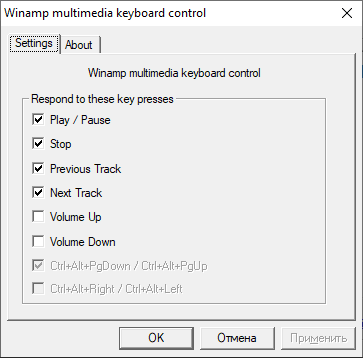
Скачать: gen_mmkb.dll.cab
Сырцы:
copy& и std::move&&
Базовый код с запретом копирования и присваивания
Если вы пока точно не знаете, как будет использоваться класс, лучше всего просто запретить копирование и присваивание. По умолчанию они разрешены и просто копируют все атрибуты класса. Часто это не то, чего вы хотите. Например, тупо копировать какие-то указатели, файловые дескрипторы или мьютексы, являющиеся атрибутами класса, явно плохая идея. Простейший код, в котором копирование и присваивание класса явно запрещены:
|
1 2 3 4 5 6 7 8 9 10 11 12 13 14 15 16 17 18 19 20 21 22 23 24 25 26 27 28 29 30 31 32 33 34 35 36 37 38 39 |
#include <iostream> class Coord2D { public: Coord2D() { _x = 0; _y = 0; std::cout << «Coord2D(x = « << _x << «, y = « << _y << «) created» << std::endl; } Coord2D(int x, int y) { _x = x; _y = y; std::cout << «Coord2D(x = « << _x << «, y = « << _y << «) created» << std::endl; } ~Coord2D() { std::cout << «Coord2D(x = « << _x << «, y = « << _y << «) destroyed» << std::endl; } int getX() const { return _x; } int getY() const { return _y; } Coord2D& setX(int x) { _x = x; return *this; } Coord2D& setY(int y) { _y = y; return *this; } Coord2D(Coord2D const &) = delete; void operator=(Coord2D const &) = delete; private: int _x, _y; }; int main() { Coord2D c1; Coord2D c2(1, 2); std::cout << «Hi!» << std::endl; } |
Вывод программы:
|
1 2 3 4 5 |
Coord2D(x = 0, y = 0) created Coord2D(x = 1, y = 2) created Hi! Coord2D(x = 1, y = 2) destroyed Coord2D(x = 0, y = 0) destroyed |
Пока что никаких неожиданностей. Стоит отметить, что вместо:
|
1 2 |
Coord2D(Coord2D const &) = delete; void operator=(Coord2D const &) = delete; |
… можно написать:
|
1 2 |
Coord2D(Coord2D const &) = default; void operator=(Coord2D const &) = default; |
… тем самым явно указав на то, что вас устраивают реализации по умолчанию.
Copy constructor
Объявим copy contructor:
|
1 2 3 4 5 6 7 8 9 10 11 12 13 14 15 16 |
/* … */ Coord2D(Coord2D const & obj) { _x = obj._x; _y = obj._y; std::cout << «Coord2D(x = « << _x << «, y = « << _y << «) copied» << std::endl; } /* … */ int main() { Coord2D c1(1, 2); Coord2D c2(c1); Coord2D c3 = c1; std::cout << «Hi!» << std::endl; } |
Заметьте, что в нем мы имеем доступ к private полям второго экземпляра класса (obj), несмотря на то, что это другой экземпляр. Вывод программы:
|
1 2 3 4 5 6 7 |
Coord2D(x = 1, y = 2) created Coord2D(x = 1, y = 2) copied Coord2D(x = 1, y = 2) copied Hi! Coord2D(x = 1, y = 2) destroyed Coord2D(x = 1, y = 2) destroyed Coord2D(x = 1, y = 2) destroyed |
Оба синтаксиса эквивалентны, в обоих случаях был вызван copy constructor. Конструктор для каждого объекта был вызван один раз. Можно было и не писать этот код, так как реализация copy constructor по умолчанию и так просто копирует атрибуты класса.
Copy assignment
Объявим copy assignment оператор:
|
1 2 3 4 5 6 7 8 9 10 11 12 13 14 15 16 17 18 19 |
/* … */ void operator=(Coord2D const & obj) { _x = obj._x; _y = obj._y; std::cout << «Coord2D(x = « << _x << «, y = « << _y << «) copy-assigned» << std::endl; } /* … */ int main() { Coord2D c1(1, 2); Coord2D c2(c1); Coord2D c3 = c1; c2 = c3; std::cout << «Hi!» << std::endl; } |
Вывод:
Coord2D(x = 1, y = 2) copied
Coord2D(x = 1, y = 2) copied
Coord2D(x = 1, y = 2) copy-assigned
Hi!
Coord2D(x = 1, y = 2) destroyed
Coord2D(x = 1, y = 2) destroyed
Coord2D(x = 1, y = 2) destroyed
Заметьте, что деструктор при присвоении не вызывается. Это означает, что в реализации copy assignment следует освобождать старые ресурсы перед присвоением новых значений.
Move constructor
Перепишем код следующим образом:
|
1 2 3 4 5 6 7 8 9 10 11 |
/* … */ Coord2D id(Coord2D x) { std::cout << «id called» << std::endl; return x; } int main() { Coord2D c1 = id(Coord2D(1,2)); c1.setX(—1); std::cout << «Hi!» << std::endl; } |
Вывод:
id called
Coord2D(x = 1, y = 2) copied
Coord2D(x = 1, y = 2) destroyed
Hi!
Coord2D(x = -1, y = 2) destroyed
Как видите, мы создаем копию из временного объекта, после чего он сразу уничтожается. Для нас это не проблема, так как объект маленький. Но если бы он содержал в себе большие объемы данных, мы бы создали их полную копию, а затем одну из копий освободили бы. Для решения этой проблемы придумали move constructor:
|
1 2 3 4 5 6 7 8 |
/* … */ Coord2D(Coord2D&& obj) { _x = obj._x; _y = obj._y; std::cout << «Coord2D(x = « << _x << «, y = « << _y << «) moved» << std::endl; } /* … */ |
Вывод:
id called
Coord2D(x = 1, y = 2) moved
Coord2D(x = 1, y = 2) destroyed
Hi!
Coord2D(x = -1, y = 2) destroyed
Move constructor вызывается вместо copy constructor в случае, когда объект, из которого создается копия, вот-вот будет уничтожен. В таком конструкторе обычно данные из временного объекта переносятся в новый объект, а полям временного объекта присваиваются nullptr или что-то такое. Важно понимать, что при выходе из move constructor оба объекта должны оставаться валидными и для обоих должен корректно отрабатывать деструктор. Ссылка T&& называется rvalue reference и означает ссылку на объект, который вот-вот будет уничтожен.
Move assignment
Аналогично move constructor, только для присваивания. Например, код:
|
1 2 3 4 5 |
int main() { Coord2D c1(1,2); c1 = Coord2D(4,5); std::cout << «Hi!» << std::endl; } |
… выведет:
Coord2D(x = 4, y = 5) created
Coord2D(x = 4, y = 5) copy-assigned
Coord2D(x = 4, y = 5) destroyed
Hi!
Coord2D(x = 4, y = 5) destroyed
Объявим move assignment оператор:
|
1 2 3 4 5 6 7 8 |
/* … */ void operator=(Coord2D&& obj) { _x = obj._x; _y = obj._y; std::cout << «Coord2D(x = « << _x << «, y = « << _y << «) move-assigned» << std::endl; } /* … */ |
Вывод:
Coord2D(x = 4, y = 5) created
Coord2D(x = 4, y = 5) move-assigned
Coord2D(x = 4, y = 5) destroyed
Hi!
Coord2D(x = 4, y = 5) destroyed
Move assignment оператор позволяет применить те же оптимизации, что и move constructor. В move constructor поля объекта, переданного в качестве аргумента, обычно как-то зануляются. В move assignment лучше сделать swap полей в двух объектах. Это позволит избавиться от дублирования кода между оператором move assignment и деструктором.
std::move
Move constructor бывает трудно стриггерить. Например, код:
|
1 2 3 4 |
int main() { Coord2D c1(Coord2D(1,2).setX(5)); std::cout << «Hi!» << std::endl; } |
… выведет:
Coord2D(x = 5, y = 2) copied
Coord2D(x = 5, y = 2) destroyed
Hi!
Coord2D(x = 5, y = 2) destroyed
Так происходит, потому что метод setX возвращает lvalue reference, а у move constructor на входе совершенно другой тип, rvalue reference. Чтобы явно показать, что временный объект мы больше использовать не будем, предусмотрен std:move. Если переписать код так:
|
1 2 3 4 |
int main() { Coord2D c1(std::move(Coord2D(1,2).setX(5))); std::cout << «Hi!» << std::endl; } |
… программа выведет:
Coord2D(x = 5, y = 2) moved
Coord2D(x = 5, y = 2) destroyed
Hi!
Coord2D(x = 5, y = 2) destroyed
В сущности, std::move просто кастует lvalue reference (T&) в rvalue reference (T&&), больше ничего. При чтении кода std::move как бы говорит нам, что мы отдаем владение объектом в этом месте и далее не собираемся его использовать.
std::forward
Шаблон std::forward предназначен исключительно для написания шаблонных методов, способных принимать на вход как lvalue, так и rvalue, в зависимости от того, что передал пользователь, и передавать соответствующий тип далее без изменений. Техника получила название perfect forwarding.
Рассмотрим пример. Определим оператор сложения двух координат:
|
1 2 3 4 5 6 7 8 9 10 11 12 13 14 15 16 17 18 |
/* … */ template<class T> friend Coord2D operator+(T&& a, const Coord2D& b) { std::cout << «Creating Coord2D t…» << std::endl; Coord2D t(std::forward<T>(a)); std::cout << «Coord2D t created!» << std::endl; return t.setX(t.getX() + b.getX()).setY(t.getY() + b.getY()); } /* … */ int main() { Coord2D c1(1,1), c2(1,2), c3(1,3); Coord2D c4 = c1 + c2 + c3; std::cout << «Hi!» << std::endl; } |
Вывод:
Coord2D(x = 1, y = 2) created
Coord2D(x = 1, y = 3) created
Creating
Coord2D t…Coord2D(x = 1, y = 1) copied
Coord2D t created!Coord2D(x = 2, y = 3) copied
Coord2D(x = 2, y = 3) destroyed
Creating
Coord2D t…Coord2D(x = 2, y = 3) moved
Coord2D t created![…]
Смотрите, что происходит. При первом вызове оператора сложения переменная t инициализируется при помощи copy constructor, так как c1 не является временным объектом. Однако при втором вызове первым аргументом передается временный объект c1 + c2, и из него переменная t инициализируется уже при помощи move constructor. То есть, фактически std::forward позволил написать процедуру один раз, вместо того, чтобы писать две версии — одну, принимающую первым аргументом lvalue reference, и вторую, работающую с rvalue reference.
Заключение
Заметьте, что думать про всякие move semantics и perfect forwarding нужно только при работе с объектами, держащими в себе много данных, и только если вы часто копируете или присваиваете такие объекты. Это исключительно оптимизация, и без нее все будет совершенно корректно работать (более того, ничего этого не существовало до появления C++11). Пока профайлер не говорит вам, что вы во что-то такое не уперлись, возможно, не стоит заморачиваться. Помните также, что компилятор зачастую может избавляться от лишнего копирования объектов, см return value optimization (RVO) и copy elision.
С другой стороны, теорию понимать стоит независимо от того, упирается ваш код в копирование и перемещение объектов, или нет. Как минимум, move semantics и иже с ним может использоваться в чужом коде. В частности, он используется в STL, см например метод emplace_back класса std::vector или метод emplace класса std::map. Кроме того, понимание move semantics будет весьма нелишним при использовании умных указателей.
Дополнительные материалы:
- В книге Effective Modern C++, вся глава 5 посвящена move semantics и perfect forwarding;
- Про RVO и NRVO хорошо написано в блоге Елены Сагалаевой;
Александр Алексеев (“R2AUK”) eax.me/cpp-copying-and-moving
Установка Linux KVM и гостевой ОС
KVM (Kernel-based Virtual Machine) – Linux-решение, которое обеспечивает виртуализацию x86-платформы, поддерживающей Intel VT (Virtualization Technology) или AMD SVM (Secure Virtual Machine).
Разрабатывается компанией Red Hat.
Чтобы проверить, поддерживает ли ваша платформа VT или SVM – дайте команду
|
1 |
egrep '(vmx|svm)' /proc/cpuinfo |
Если вывод команды не пустой, значит поддерживает.
Устанавливаем KVM:
|
1 |
apt-get install kvm libvirt-bin virtinst bridge-utils |
Создаем мост – в файл /etc/sysctl.conf добавляем строки:
|
1 2 |
net.ipv4.conf.all.forwarding=1 net.ipv4.conf.all.proxy_arp=1 |
и даем команду sysctl -p
Для моста в файл /etc/network/interfaces добавляем новый сетевой интерфейс, например kvmbr0 – в результате файл interfaces получился приблизительно таким:
|
1 2 3 4 5 6 7 8 9 10 11 12 13 14 15 |
# The loopback network interface auto lo iface lo inet loopback # The primary network interface auto eth0 iface eth0 inet manual auto kvmbr0 iface kvmbr0 inet static address 10.45.11.192 network 10.45.11.0 netmask 255.255.255.0 broadcast 10.45.11.255 gateway 10.45.11.254 bridge_ports eth0 # dns-nameservers 10.81.101.5 |
Перезагрузим сеть:
|
1 |
/etc/init.d/networking restart |
Теперь вывод brctl show должен показать примерно следующее:
kvmbr0 8000.f46d04976c46 no eth0
У меня все будет в домашнем каталоге /home/sborka
Скачиваем (или передаем между компьютерами через scp/nc) в домашний каталог iso-образ (дистрибутив) той операционной системы, которая впоследствии будет гостевой.
Создаем файл-диск виртуальной системы (здесь 10 Гб):
dd if=/dev/zero of=/home/sborka/vmwindows.img bs=1024k count=10000
При запуске следующей команды может появиться сообщение:
Unable to connect to graphical console: virt-viewer not installed. Please install the ‘virt-viewer’ package. – не обращайте на него внимания.
Сама команда – установка гостевой ОС:
|
1 |
virt-install -n winda -r 1024 -f /home/sborka/vmwindows.img -s 30 -c /home/sborka/windows.iso --accelerate --os-type=windows --vnc -v -w bridge:kvmbr0 |
(“–os-type=linux –os-variant=generic26” для линуксов)
где:
-r 1024 – количество памяти выделяемой под виртуальную машину (в мегабайтах)
–vnc – включаем VNC (будет слушать на localhost:5900, позже сделаем SSH-туннель)
-w bridge:kvmbr0 – подключаем к сети на интерфейс kvmbr0
Как я предупреждал ранее, если после запуска этой команды не появилось никаких ошибок, а отобразилось что-то вида:
Starting install…
Creating domain… 0 B 00:01
Unable to connect to graphical console: virt-viewer not installed. Please install the ‘virt-viewer’ package.
Domain installation still in progress. You can reconnect to the console to complete the installation process.
то все отлично, виртуальная машина запустилась (можно проверить командой virsh -c qemu:///system list –all)
Теперь с любого компьютера пробрасываем SSH-туннель:
|
1 |
ssh -L 5900:localhost:5900 root@HOST_SERVER_IP |
и remmina на localhost:5900
или
Устанавливаем (если в самом начале не установили, а настраивали сервер локально) ssh-клиент, или, например, kitty. Запускаем, настраиваем:
Во вкладке Session — Host Name (or IP address) адрес нашего хост-сервера (в моем случае 172.16.4.24).
Во вкладке Windows-Translation — выбираем UTF-8.
Во вкладке Connection-SSH-Tunnels — заполняем поля Source port 59000, Destination localhost:5900, нажимаем Add.
Жмем Open и мы должны подключиться по SSH к хост-серверу. Одновременно у нас произойдет перенаправление порта 5900 хост-сервера (порт vnc-сервера) на наш локальный порт 59000.
Если у вас появляется ошибка: “qemu: could not open disk image … : Permission denied”, скопируйте .img/.iso файлы в /var/lib/libvirt/images, чтобы SELinux “не был против”
Администрирование виртуальных машин:
Для начала запускаем консоль управления
|
1 |
sudo virsh |
и уже в ней:
list –all -посмотреть все виртуальные машины
destroy имя виртуальной машины – жесткое выключение виртуальной машины
undefine имя виртуальной машины – удалить виртуальную машину(не забываем потом удалить файл виртуальной машины, конечно если она больше не нужна)
start имя виртуальной машины – запустить виртуальную машину
autostart имя виртуальной машины – автозагрузка виртуальной машины
autostart –disable имя виртуальной машины – выключить автозагрузку виртуальной машины
P.S. gui для KVM – virt-manager
Установка DB2 под Linux
В качестве ОС была выбрана Ubuntu Server. Базу данных запланировал разместить на /home и поэтому выделил под этот раздел большую часть диска.
Для начала заполним sysctl. Я выделил для сервера 8 Гб озу, соответственно
|
1 |
grep MemTotal /proc/meminfo |
MemTotal: 8178400 kB – в shmmax записал цифру 8000000000
Также использовал формулу shmall = shmmax * 0,9 / 4096 и взял данные из документации IBM DB2 Express-C 10.1
В /etc/sysctl.conf внес следующие строки:
|
1 2 3 4 5 |
kernel.sem = 250 256000 32 1024 kernel.msgmax = 65535 kernel.msgmnb = 65535 kernel.shmmax = 8000000000 kernel.shmall = 1757812 |
далее команда sysctl -p
Устанавливаем зависимости:
apt-get install alien binutils build-essential cpp-4.4 debhelper g++-4.4 gawk gcc-4.4 gcc-4.4-base gettext html2text ia32-libs intltool-debian ksh lesstif2 lib32bz2-dev lib32z1-dev libaio-dev libaio1 libbeecrypt7 libc6 libc6-dev libc6-dev-i386 libdb4.8 libelf-dev libelf1 libltdl-dev libltdl7 libmotif4 libodbcinstq4-1 libodbcinstq4-1:i386 libqt4-core libqt4-gui libsqlite3-0 libstdc++5 libstdc++6 libstdc++6-4.4-dev lsb lsb-core lsb-cxx lsb-desktop lsb-graphics lsb-qt4 make odbcinst openjdk-6-jdk pax po-debconf rpm rpm-common sysstat tzdata-java unixodbc unixodbc-dev unzip
Как уже упоминал выше, в моем случае Ubuntu без менеджера окон, а установщик DB2 использует GUI.
Многим здесь ничего не мешает установить lubuntu-core, xinit и запустив иксы через startx произвести инсталляцию DB2 (../expc/db2setup)
Я же проброшу дисплей на свой рабочий линукс – вношу в /etc/ssh/ssh_config строки:
|
1 2 |
ForwardX11 yes X11Forwarding yes |
и подключаюсь к серверу добавив параметры -XY к ssh:
|
1 |
ssh -XY -l root ubuntuserver_ip |
Теперь весь вывод иксов с сервера пойдет на мой рабочий стол (xauth).
Распаковываем db2_v101_linuxx64_expc.tar.gz и даем команду
./expc/db2setup
Во время установки я указал такие данные:
| Пользователь | Логин | Группа | Пароль | Расположение |
| Администратор сервера | dasusr1 | dasadm1 | dasusr1 | /home/dasusr1 |
| Владелец экземпляра | db2inst1 | db2iadm1 | db2inst1 | /home/db2inst1 |
| Изолированный | db2fenc1 | db2fadm1 | db2fenc1 | /home/db2fenc1 |
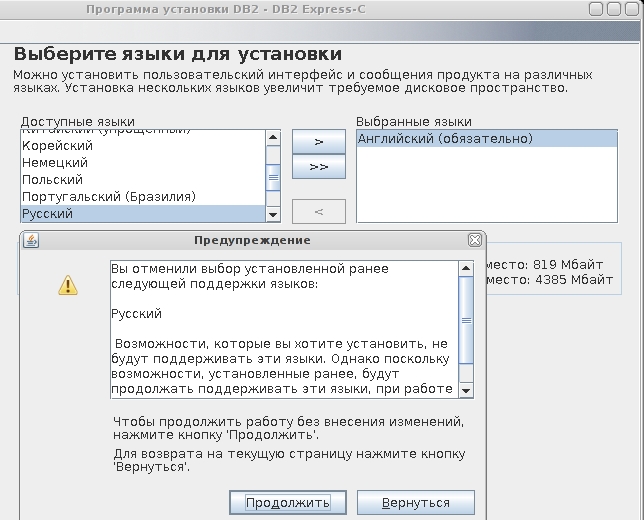
При выборочной установке также убрал русский язык – установщик не мог найти файл русских сообщений.
Затем поправил шеллы вновь созданных пользователей в /etc/passwd с sh на bash:
|
1 2 3 |
dasusr1:x:1001:119::/home/dasusr1:/bin/bash db2inst1:x:1002:120::/home/db2inst1:/bin/bash db2fenc1:x:1003:121::/home/db2fenc1:/bin/bash |
Далее конфигурируем DB2 для работы с 1С. Заходим под пользователем db2inst1: su db2inst1
и даем команду db2set DB2_WORKLOAD=1C
Возвращаемся в root через Ctrl-D (logout).
Добавляем в /etc/services строку:
|
1 |
db2c_db2inst1 50000/tcp |
Настраиваем автозапуск сервера – создаем файл /etc/init.d/db2autostart
|
1 2 3 4 5 6 7 8 9 10 11 12 13 14 15 16 |
#! /bin/sh # /etc/init.d/db2autostart # case "$1" in start) sudo -u db2inst1 /home/db2inst1/sqllib/adm/db2start ;; stop) sudo -u db2inst1 /home/db2inst1/sqllib/adm/db2stop ;; *) echo "Usage: /etc/init.d/db2autostart {start|stop}" exit 1 ;; esac exit 0 |
Затем выполняем update-rc.d db2autostart defaults и ./db2iauto -on db2inst1 (из /opt/ibm/db2/V10.1/bin)
Отправляем сервер на перезагрузку и пробуем создать базу – например, db_name в 1C (пользователь и пароль db2inst1).
Чтобы 1C не ругалась, что не хватает памяти, на сервере от имени db2inst1 выполняем комаанды:
|
1 2 3 4 |
db2 UPDATE DATABASE CONFIGURATION FOR db_name USING LOGFILSIZ 4000 db2 UPDATE DATABASE CONFIGURATION FOR db_name USING LOGPRIMARY 16 db2 UPDATE DATABASE CONFIGURATION FOR db_name USING LOGSECOND 128 UPDATE DATABASE CONFIGURATION FOR db_name USING APPLHEAPSZ 4096 |
При переключении языка по Ctrl+Shift не работают комбинации Ctrl+Shift+[key]
При настройке переключения раскладок по Ctrl+Shift, горячие клавиши вида Ctrl+Shift+[key] отказываются работать.
Для исправления этой проблемы необходимо установить патч (переключение языка после применения патча срабатывает не на нажатие, а на отпускание клавиш Ctrl+Shift).
Делаем все из под рута.
Создадим папку под исходные коды и будущие deb-файлы:
|
1 |
mkdir xorg-server && cd xorg-server |
Получаем исходники:
|
1 |
apt-get source xorg-server |
Устанавливаем пакеты, необходимые для сборки:
|
1 2 |
apt-get install dpkg-dev devscripts apt-get build-dep xorg-server |
Теперь перейдем в папку debian/patches
Сохраняем сюда файл патча, например, под именем x1_7_7p
Затем добавляем его в список:
|
1 |
echo x1_7_7p >> ./series |
Переходим в папку повыше:
|
1 2 |
cd xorg-server_1.7.7 dch -i |
(выход Ctrl+X)
И собираем все командой
|
1 |
debuild -b -us -uc |
Затем переходим в папку с собранными deb-ами и устанавливаем их:
|
1 |
dpkg -i ./*deb |
Перезагружаемся.
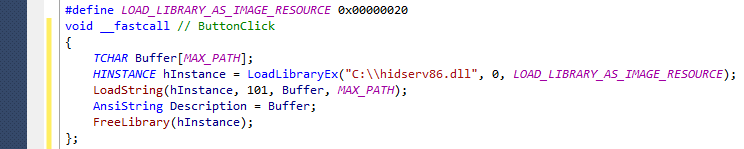
LoadString (BCB Builder)
|
1 2 3 4 5 6 7 8 9 10 11 12 |
#define LOAD_LIBRARY_AS_IMAGE_RESOURCE 0x00000020 TCHAR Buffer[MAX_PATH]; AnsiString Description; HINSTANCE hInstance = LoadLibraryEx("C:\\hidserv86.dll", 0, LOAD_LIBRARY_AS_IMAGE_RESOURCE); if (hInstance != NULL) { LoadString(hInstance, 101, Buffer, MAX_PATH); Description = Buffer; ShowMessage(Description); FreeLibrary(hInstance); } |
Прозрачный прокси перед Squid
На маршрутизаторе (Debian 6 Squeeze, ip1 10.2.16.181, ip2 192.168.56.1) с двумя сетевыми адаптерами необходимо предоставить интернет клиентской сети 192.168.56.0/24 как NAT (получаемый через шлюз по умолчанию). Сам маршрутизатор получает интернет от Squid (HTTP – IP 10.80.20.22, порт 3128, DNS – 10.10.110.10). В общем, необходимо выступить в роли прозрачного прокси для клиентской подсети 192.168.56.0/24.
Первым делом устанавливаем Squid 3, конфиг (/etc/squid3/squid.conf) такой:
|
1 2 3 4 5 6 7 8 9 10 11 12 13 14 |
acl Net1 src 192.168.56.0/24 cache_peer 10.80.20.22 parent 3128 # Родительский Squid acl Safe_ports port 80 acl CONNECT method CONNECT http_access allow CONNECT Safe_ports http_access allow Net1 http_access allow all http_port 192.168.56.1:3128 transparent cache_effective_user proxy dns_nameservers 10.2.16.1 10.10.110.10 # Взято из /etc/hosts cache_access_log /var/log/squid3/access.log cache_log /var/log/squid3/cache.log hosts_file /etc/hosts forwarded_for on |
Включаем форвардинг:
|
1 |
echo 1 > /proc/sys/net/ipv4/ip_forward |
Чтобы форвардинг автоматически включался при запуске системы в /etc/sysctl.conf добавляем строчку:
|
1 |
net.ipv4.ip_forward = 1 |
Затем добавляем правила в iptables:
|
1 2 3 4 |
iptables -t nat -A PREROUTING -d 192.168.56.1/32 -p udp -m udp --dport 53 -j DNAT --to-destination 10.10.110.10:53 iptables -t nat -A PREROUTING -s 192.168.56.0/24 -i vboxnet0 -p tcp -m multiport --dports 80,8080 -j DNAT --to-destination 192.168.56.1:3128 iptables -t nat -A PREROUTING -p tcp -d 192.168.56.1 --dport 53 -j DNAT --to-destination 10.10.110.10:53 iptables -t nat -A POSTROUTING -p udp -d 10.10.110.10 --dport 53 -j SNAT --to-source 10.2.16.181 |
Чтобы работало после перезагрузки, сохраняем настройки iptables в файл:
|
1 |
sudo iptables-save > /etc/iptables.rooslan |
И добавляем в конец файла /etc/network/interfaces:
|
1 |
pre-up iptables-restore < /etc/iptables.rooslan |
Не забудьте у клиента в качестве DNS-сервера и шлюза по умолчанию выставить свой IP-адрес (192.168.56.1)
Настройка BackupPC на SUSE Linux
Создаем пользователя backuppc:
|
1 |
useradd -gwww -d/srv/backuppc -s/bin/false -m backuppc |
Ставим Апач:
|
1 2 |
yast2 --install apache2 vi /srv/www/htdocs/index.html |
и вводим здесь, например, такой текст:
Добро пожаловать!
Через 2 секунды вы будете перенаправлены на страницу BackupPC
|
1 |
vi /srv/www/cgi-bin/.htaccess |
Файл должен содержать:
|
1 2 3 4 |
AuthType Basic AuthName "Username / Password Required" AuthUserFile /srv/backuppc/password.file Require valid-user |
Добавляем пользователя админа BackupPC, задаем ему пароль:
|
1 |
htpasswd2 -c /srv/backuppc/password.file adminuser |
Апач должен запускаться от имени пользователя “backuppc”. Приведем файл /etc/apache/uid.conf к такому виду:
|
1 2 |
User backuppc Group www |
Чтобы спрашивал пароль при доступе к веб-интерфейсу, вносим такие изменения в файл /etc/apache2/default-server.conf
|
1 2 3 |
AllowOverride AuthConfig Options +ExecCGI -Includes Order Deny,Allow |
Вносим Апач в автостарт:
|
1 |
chkconfig --set apache2 on |
и [пере]запускаем:
|
1 |
rcapache2 restart |
Предварительно разрешаем зависимости BackupPC перед установкой.
|
1 2 3 4 5 6 7 8 9 10 |
zypper repos | Псевдоним | Имя | Включён | Обновление --+-----------------+-----------------------+-----------+----------- 1 | openSUSE 11.1-0 | openSUSE 11.1-0 | Да | Нет 2 | repo-debug | openSUSE-11.1-Debug | Нет | Да 3 | repo-non-oss | openSUSE-11.1-Non-Oss | Да | Да 4 | repo-oss | openSUSE-11.1-Oss | Да | Да 5 | repo-source | openSUSE-11.1-Source | Нет | Да 6 | repo-update | openSUSE-11.1-Update | Да | Да |
Выключаю поиск DVD-диска, чтобы скачивалось из репозиториев.
|
1 |
zypper mr -d 1 |
Репозиторий ‘openSUSE 11.1-0’ успешно отключён.
И ставим необходимые библиотеки:
|
1 |
yast -i perl-Archive-Zip perl-Compress-Zlib |
Забираем и устанавливаем RsyncP:
|
1 2 3 4 5 |
wget http://www.pcc-services.com/sles/backuppc/perl-File-RsyncP-0.68-SLED.v1.i586.rpm yast -i perl-File-RsyncP* chmod -R go+rX /usr/lib/perl5/site_perl/5.10.0/i586-linux-thread-multi/ yast -i gcc perl -MCPAN -e 'install File::RsyncP' |
Установка BackupPC:
|
1 2 3 4 |
wget http://www.pcc-services.com/sles/backuppc/BackupPC-3.0.0.tar.gz tar zxf BackupPC-3.0.0.tar.gz cd BackupPC-3.0.0 perl configure.pl |
–> Are these paths correct? [y]? Жмем Enter.
–> BackupPC will run on host [имя_host’а]? Жмем Enter.
–> BackupPC should run as user [backuppc]? Жмем Enter.
–> Install directory (full path) [/usr/local/BackupPC]? /opt/BackupPC
–> Data directory (full path) [/data/BackupPC]? /srv/backuppc
–> CGI bin directory (full path) [ ]? /srv/www/cgi-bin
–> Apache image directory (full path) [ ]? /srv/www/htdocs/BackupPC
–> URL for image directory (omit http://host; starts with ‘/’) [ ]? /BackupPC
–> Do you want to continue? [y]? Жмем Enter.
Скрипт отработает и предложит нам “Enjoy!”
|
1 2 3 4 5 6 7 8 9 10 11 12 13 14 |
# vi /etc/BackupPC/config.pl адрес по которому будут высылаться отчеты о проблемах: $Conf{EmailAdminUserName} = 'admin@example.com'; директория, в которую BackupPC будет складывать архивы: (chown backuppc /where/backups/stored) $Conf{TopDir} = '/where/backups/stored'; будем бэкапить винду: $Conf{ClientCharset} = 'cp1251'; время, в которое BackupPC будет проводить backup: $Conf{WakeupSchedule} = [21.5]; # каждый день в 21:30 |
Так как BackupPC не разрабатывался под SUSE, для решения проблем с автозапуском
выполняем эти команды:
|
1 2 3 4 5 6 7 |
wget http://www.pcc-services.com/sles/backuppc/backuppc install -m 0755 backuppc /etc/init.d/ chkconfig -a backuppc chown backuppc /etc/BackupPC/ chown backuppc /etc/BackupPC/* chown backuppc /srv/www/cgi-bin/BackupPC_Admin /etc/init.d/backuppc start |
Рассмотрим вариант бэкапа данных Windows Server 2003. Для этого скачиваем файл cygwin-rsyncd-2.6.8_0.zip и распаковываем в папку C:\rsyncd\
В файле rsyncd.conf (список “общих директорий” схож с конфигом Самбы) правим:
“auth users = backuppc_user” для каждой “общей директории”.
Затем в rsyncd.secrets добавляем:
|
1 |
backuppc_user:password |
Для секюрности можно дать права на чтение файлу rsyncd.secrets только учетной записи “SYSTEM”
Запускаем отсюда же services.bat, чтобы установилась служба rsync.
Теперь снова переходим на наш SUSE-сервер:
|
1 2 3 4 |
mkdir /etc/BackupPC/pc chown backuppc /etc/BackupPC/pc/ vi /etc/BackupPC/pc/imya_client_compa.pl chown backuppc /etc/BackupPC/pc/imya_client_compa.pl |
вносим в этот файл следующие строки:
|
1 2 3 4 |
$Conf{XferMethod} = 'rsyncd'; $Conf{RsyncdUserName} = 'backuppc_user'; $Conf{RsyncdPasswd} = 'password'; $Conf{RsyncShareName} = 'ИмяОбщейПапкиWindows_В_rsyncd.conf'; |
Чтобы сервер BackupPC “увидел” этого клиента, добавьте imya_client_compa в файл /etc/BackupPC/hosts и соответственно, запись с сопоставлением IP-адреса в /etc/hosts
Чтобы правильно отображались русских имена файлов и папок в файле /opt/BackupPC/lib/BackupPC/CGI/Lib.pm найдите в теле процедуры Header строчку:
|
1 |
print $Cgi->header(-charset => "utf-8"); |
и замените ее на
|
1 |
print $Cgi->header(-charset=>"CP1251");> |
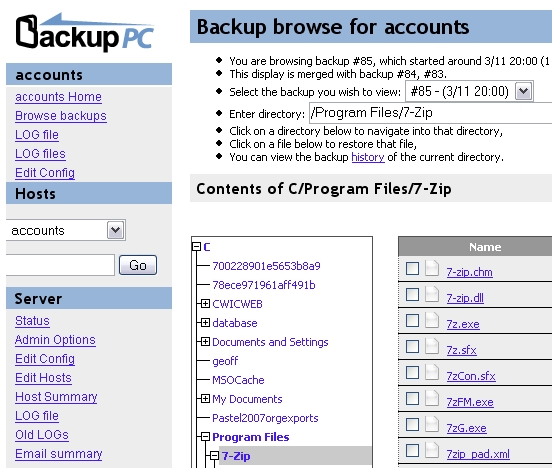
Открываем http://ip_адрес_SUSE_сервера/cgi-bin/BackupPC_Admin
вводим ранее созданные логин и пароль (у меня adminuser) и настраиваем.
Скриншот из сервиса Windows 7
Программа-сервис Windows XP, делающая снимки экрана, после переноса на Windows 7 начала сохранять вместо снимков просто белый фон.
Чтобы использовать основанную на коде ниже программу ru1smake, распакуйте архив в отдельную папку, установите ее как сервис (командой ru1smake.exe /install), задайте параметры в конфигурационном файле ru1smake.conf и запускайте через диспетчер служб. Удаление – командой ru1smake.exe /uninstall. Программа будет автоматически делать снимки экрана согласно указанным в конфиге параметрам.
Скачать программу ru1smake
версия 0.1 (07.08.10) | 0.3 Мб | stable
Дело в том, что начиная с Windows Vista, служба, запущенная от имени SYSTEM, более не может взаимодействовать с рабочим столом – службы теперь запускаются в изолированном сеансе (сессии) и загрузка своего процесса приведет к попытке запуска в неверном (вошедшего в систему пользователя) сеансе. Решить проблему можно, получив сессию залогинившегося пользователя. Вкратце, этот код делает следующее:
- Получает токен вошедшего в систему в данный момент пользователя, используя функцию WtsGetActiveConsoleSessionID
- Далее получает пользовательский токен, назначенный процессу (токен для службы от имени SYSTEM)
- Затем этот токен дублируется
- У скопированного токена изменяется сеанс (на вошедшего пользователя)
- Используя CreateProcessAsUser запускается процесс с измененным пользовательским токеном
Процесс с системными правами, но будучи запущенным от имени вошедшего в систему пользователя в Windows 7, также позволит корректно работать GUI-программе как и любой другой.
|
1 2 3 4 5 6 7 8 9 10 11 12 13 14 15 16 17 18 19 20 21 22 23 24 25 26 27 28 29 30 31 32 33 34 35 36 37 38 39 40 41 42 43 44 45 46 47 48 49 50 51 52 53 54 55 56 57 58 59 60 61 62 63 64 65 66 67 68 69 70 71 72 73 74 75 76 77 78 79 80 81 82 83 84 85 86 87 88 89 90 91 92 93 94 95 96 97 98 99 100 101 102 103 104 105 106 107 108 109 110 111 112 113 114 115 116 117 118 119 120 121 122 123 124 125 126 127 128 129 130 131 132 133 134 135 136 137 138 139 140 141 142 143 144 145 146 147 |
#include <iostream> #include "Windows.h" #include <UserEnv.h> #include <WtsApi32.h> #include <Tlhelp32.h> #include <Tchar.h> #include <string> #pragma comment(lib,"WtsApi32.lib") #pragma comment(lib,"UserEnv.lib") void convertWStringToCharPtr(_In_ std::wstring input, _Out_ char* outputString) { size_t outputSize = input.length() + 1; // +1 for null terminator outputString = new char[outputSize]; size_t charsConverted = 0; const wchar_t* inputW = input.c_str(); wcstombs_s(&charsConverted, outputString, outputSize, inputW, input.length()); } BOOL LaunchApplication(LPCWSTR Filename) { PROCESS_INFORMATION pi; STARTUPINFO si; BOOL bResult = FALSE; DWORD dwSessionId, winlogonPid; HANDLE hUserToken, hUserTokenDup, hPToken, hProcess; DWORD dwCreationFlags; // Log the client on to the local computer. dwSessionId = WTSGetActiveConsoleSessionId(); // Find the winlogon process PROCESSENTRY32 procEntry; HANDLE hSnap = CreateToolhelp32Snapshot(TH32CS_SNAPPROCESS, 0); if (hSnap == INVALID_HANDLE_VALUE) { return 1; } procEntry.dwSize = sizeof(PROCESSENTRY32); if (!Process32First(hSnap, &procEntry)) { return 1; } do { char exeFile[13] = "winlogon.exe"; convertWStringToCharPtr(procEntry.szExeFile, exeFile); const char* cExeFile = exeFile; if (_stricmp(cExeFile, "winlogon.exe") == 0) { // We found a winlogon process... // make sure it's running in the console session DWORD winlogonSessId = 0; if (ProcessIdToSessionId(procEntry.th32ProcessID, &winlogonSessId) && winlogonSessId == dwSessionId) { winlogonPid = procEntry.th32ProcessID; break; } } } while (Process32Next(hSnap, &procEntry)); WTSQueryUserToken(dwSessionId, &hUserToken); dwCreationFlags = NORMAL_PRIORITY_CLASS | CREATE_NEW_CONSOLE; ZeroMemory(&si, sizeof(STARTUPINFO)); si.cb = sizeof(STARTUPINFO); const char* desk = "Winsta0\\Default"; size_t size = strlen(desk) + 1; wchar_t* w_desk = new wchar_t[size]; size_t outSize; mbstowcs_s(&outSize, w_desk, size, desk, size - 1); si.lpDesktop = w_desk; ZeroMemory(&pi, sizeof(pi)); TOKEN_PRIVILEGES tp; LUID luid; hProcess = OpenProcess(MAXIMUM_ALLOWED, FALSE, winlogonPid); if (!::OpenProcessToken(hProcess, TOKEN_ADJUST_PRIVILEGES | TOKEN_QUERY | TOKEN_DUPLICATE | TOKEN_ASSIGN_PRIMARY | TOKEN_ADJUST_SESSIONID | TOKEN_READ | TOKEN_WRITE, &hPToken)) { printf("OpenProcessToken: %u\n", GetLastError()); } if (!LookupPrivilegeValue(NULL, SE_DEBUG_NAME, &luid)) { printf("LookupPrivilegeValue: %u\n", GetLastError()); } tp.PrivilegeCount = 1; tp.Privileges[0].Luid = luid; tp.Privileges[0].Attributes = SE_PRIVILEGE_ENABLED; DuplicateTokenEx(hPToken, MAXIMUM_ALLOWED, NULL, SecurityIdentification, TokenPrimary, &hUserTokenDup); SetTokenInformation(hUserTokenDup, TokenSessionId, (void*)dwSessionId, sizeof(DWORD)); if (!AdjustTokenPrivileges(hUserTokenDup, FALSE, &tp, sizeof(TOKEN_PRIVILEGES), (PTOKEN_PRIVILEGES)NULL, NULL)) { printf("AdjustTokenPrivileges: %u\n", GetLastError()); } if (GetLastError() == ERROR_NOT_ALL_ASSIGNED) { printf("Token does not have the provilege\n"); } LPVOID pEnv = NULL; if (CreateEnvironmentBlock(&pEnv, hUserTokenDup, TRUE)) { dwCreationFlags |= CREATE_UNICODE_ENVIRONMENT; } else pEnv = NULL; bResult = CreateProcessAsUser( hUserTokenDup, // client's access token Filename, // file to execute NULL, // command line NULL, // pointer to process SECURITY_ATTRIBUTES NULL, // pointer to thread SECURITY_ATTRIBUTES FALSE, // handles are not inheritable dwCreationFlags, // creation flags pEnv, // pointer to new environment block NULL, // name of current directory &si, // pointer to STARTUPINFO structure &pi // receives information about new process ); //Perform All the Close Handles tasks CloseHandle(hProcess); CloseHandle(hUserToken); CloseHandle(hUserTokenDup); CloseHandle(hPToken); return 0; } |