
На Kerio Control Server открываем порты 500, 4500, 1701
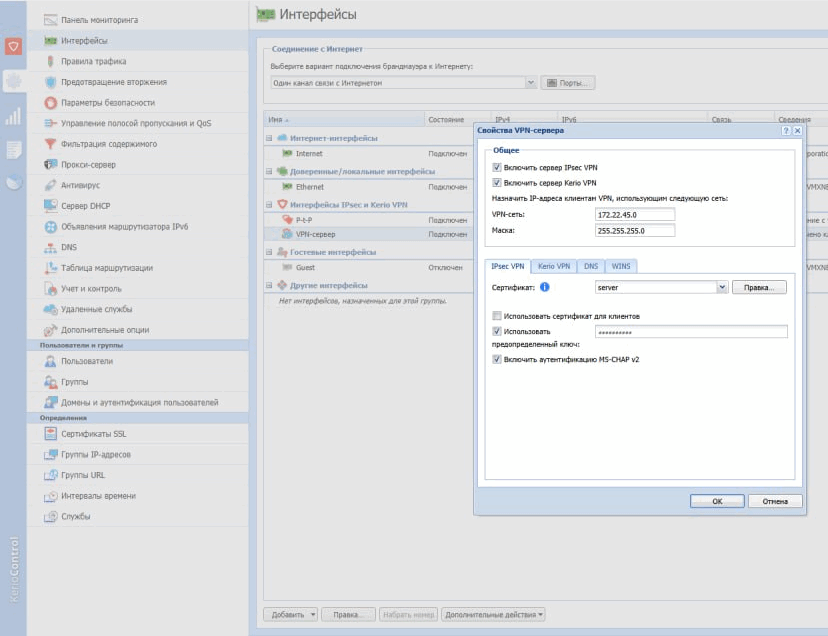
|
1 |
opkg update && opkg install xl2tpd strongswan-default |
Создаём новый интерфейс (например, с именем “ipsec”) с типом L2TP и здесь же на вкладке Firewall отмечаем его в зону “WAN”.
/etc/ipsec.conf
|
1 2 3 4 5 6 7 8 9 10 11 12 13 14 15 16 |
conn ipsec auto = start dpdaction = restart closeaction = restart type = transport authby = secret left = %defaultroute leftprotoport = udp/l2tp rightprotoport = udp/l2tp right = %IP_АДРЕС_KERIO_SERVER% rightid = %any keyingtries = %forever ike = aes128-sha1-modp1024 esp = aes128-sha1 forceencaps = yes keyexchange = ikev1 |
/etc/ipsec.secrets
|
1 |
%any %any : PSK "%PSK_SECRET_ИЗ_KERIO%" |
/etc/xl2tpd/xl2tpd.conf
|
1 2 3 4 5 6 7 8 9 10 |
[global] port = 1701 auth file = /etc/xl2tpd/xl2tp-secrets access control = no [lac ipsec] lns = %IP_АДРЕС_KERIO_SERVER% ppp debug = yes pppoptfile = /etc/ppp/options.l2tpd.client length bit = yes |
/etc/ppp/options.l2tpd.client
|
1 2 3 4 5 6 7 8 9 10 11 12 13 14 |
ipcp-accept-local ipcp-accept-remote refuse-eap require-chap noccp noauth mtu 1280 mru 1280 noipdefault defaultroute usepeerdns connect-delay 5000 name %CLIENT_USERNAME_LOGIN_ON_KERIO_SERVER% password %CLIENT_PASSWORD_ON_KERIO_SERVER% |
chmod 600 /etc/ipsec.secrets
chmod 600 /etc/ppp/options.l2tpd.client
/etc/init.d/ipsec restart
/etc/init.d/xl2tpd restart