
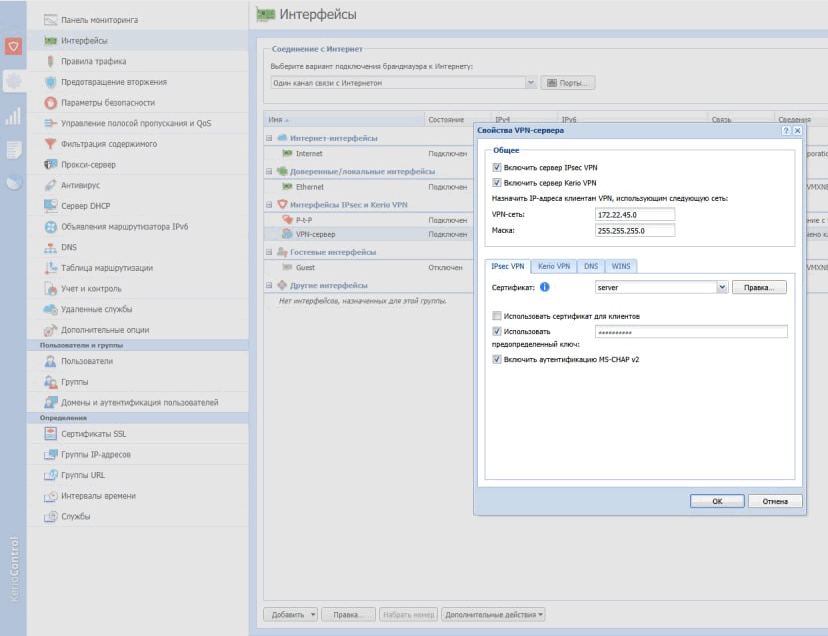
На Kerio Control Server открываем порты 500, 4500, 1701
|
1 |
opkg update && opkg install xl2tpd strongswan-default |
Создаём новый интерфейс (например, с именем “ipsec”) с типом L2TP и здесь же на вкладке Firewall отмечаем его в зону “WAN”. В свойствах интерфейса luci указываем
PAP/CHAP username – это будет %CLIENT_USERNAME_LOGIN_ON_KERIO_SERVER%
и PAP/CHAP password – %CLIENT_PASSWORD_ON_KERIO_SERVER%
(подставьте свои значения, естественно)
/etc/ipsec.conf
|
1 2 3 4 5 6 7 8 9 10 11 12 13 14 15 16 |
conn ipsec auto = start dpdaction = restart closeaction = restart type = transport authby = secret left = %defaultroute leftprotoport = udp/l2tp rightprotoport = udp/l2tp right = %IP_АДРЕС_KERIO_SERVER% rightid = %any keyingtries = %forever ike = aes128-sha1-modp1024 esp = aes128-sha1 forceencaps = yes keyexchange = ikev1 |
/etc/ipsec.secrets
|
1 |
%any %any : PSK "%PSK_SECRET_ИЗ_KERIO%" |
/etc/xl2tpd/xl2tpd.conf
|
1 2 3 4 5 6 7 8 9 10 |
[global] port = 1701 auth file = /etc/xl2tpd/xl2tp-secrets access control = no [lac ipsec] lns = %IP_АДРЕС_KERIO_SERVER% ppp debug = yes pppoptfile = /etc/ppp/options.l2tpd.client length bit = yes |
/etc/ppp/options.l2tpd.client
|
1 2 3 4 5 6 7 8 9 10 11 12 13 14 |
ipcp-accept-local ipcp-accept-remote refuse-eap require-chap noccp noauth mtu 1280 mru 1280 noipdefault defaultroute usepeerdns connect-delay 5000 name %CLIENT_USERNAME_LOGIN_ON_KERIO_SERVER% password %CLIENT_PASSWORD_ON_KERIO_SERVER% |
chmod 600 /etc/ipsec.secrets
chmod 600 /etc/ppp/options.l2tpd.client
/etc/init.d/ipsec restart
/etc/init.d/xl2tpd restart
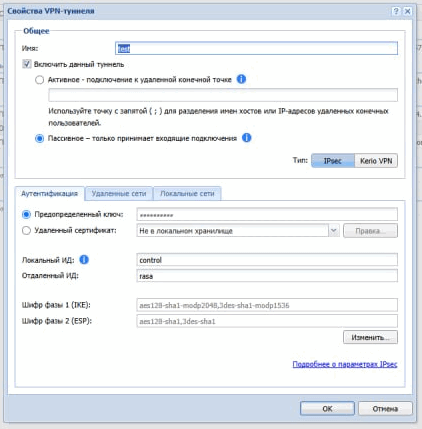
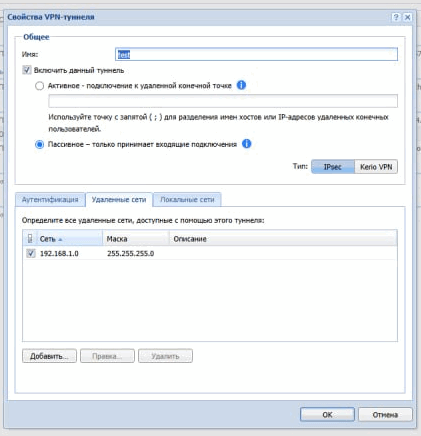
Для ipsec-туннеля до Kerio Control
(kerio id – control, client id – rasa):
opkg install strongswan-mod-openssl
/etc/strongswan.d/charon/gmp.conf – load=no
/etc/ipsec.secrets остаётся как выше, с ключом PSK
/etc/ipsec.conf:
|
1 2 3 4 5 6 7 8 9 10 11 12 13 14 15 16 17 18 19 20 21 22 |
config setup uniqueids=no conn kerio-site keyexchange=ikev1 type=tunnel authby=secret left=%defaultroute leftid=@rasa leftsubnet=192.168.1.0/24 right=%IP_АДРЕС_KERIO_SERVER% rightid=@control rightsubnet=192.168.0.0/24 ike=aes128-sha1-modp2048! esp=aes128-sha1! forceencaps=yes dpdaction=restart dpddelay=30s keyingtries=%forever ikelifetime=8h keylife=1h auto=start |
/etc/strongswan.conf
|
1 2 3 4 5 6 7 8 |
charon { load = charon aes des sha1 sha2 md5 random nonce hmac openssl kernel-netlink socket-default stroke updown xauth-generic plugins { include strongswan.d/charon/*.conf } } include strongswan.d/*.conf |
В /etc/config/firewall добавляем
|
1 2 3 4 5 6 7 8 9 10 11 12 13 14 15 16 17 18 19 |
config nat option src 'lan' option dest 'wan' option dest_ip '192.168.0.0/24' option target 'ACCEPT' config rule option src 'wan' option dest 'lan' option src_ip '192.168.0.0/24' option dest_ip '192.168.1.0/24' option target 'ACCEPT' config rule option src 'lan' option dest 'wan' option src_ip '192.168.1.0/24' option dest_ip '192.168.0.0/24' option target 'ACCEPT' |
В /etc/firewall.user добавляем
|
1 |
iptables -t nat -I POSTROUTING -s 192.168.1.0/24 -d 192.168.0.0/24 -j ACCEPT |
и включаем автозагрузку: /etc/init.d/ipsec enable